苹果应用商店和谷歌应用商店对 Securus 和 JPay 移动应用的新要求

已发布:

延迟

由于地方法院最近颁布的禁令,该应用程序的强制执行已被暂停,直到法院对此案作出裁决。

用户仍需年满 18 岁才能在 Apple 或 Google Play 应用商店下载应用。


我们致力于确保您的使用体验安全可靠,并符合现行法规。为与最新立法保持一致,Securus Mobile 和 JPay 应用现已要求用户进行年龄验证。此项要求源于应用商店政策,旨在确认用户已年满 18 周岁——JPay 或 Securus 不会借此收集您的个人信息。

发生了哪些变化?

  • 从 2025 年 12 月 8 日起(iOS 版)和 2026 年 1 月 1 日起(Android 版),您需要根据您的 Apple 或 Google 帐户信息确认您已年满 18 岁。
  • 如果您尚未提供年龄信息,该应用程序将引导您通过简单的步骤更新您的帐户,以便您可以继续使用该应用程序。
  • 网站不受影响——您仍然可以无需年龄验证即可访问它们。

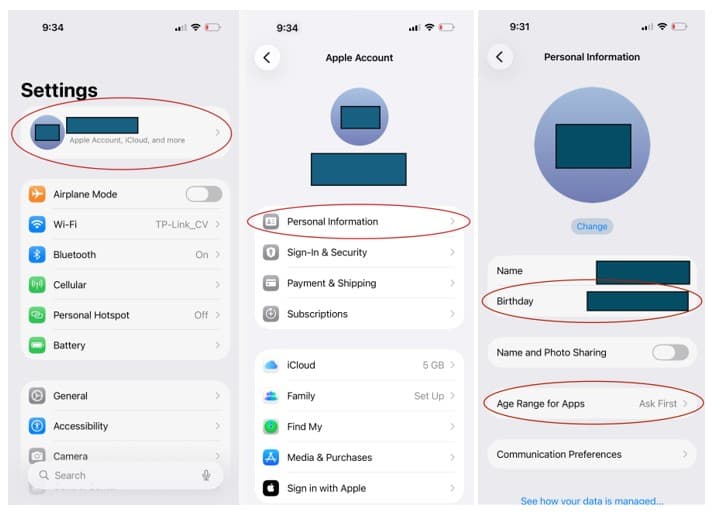
在 Apple iOS 上更新您的年龄:

  1. 打开设备上的“设置”
  2. 点击顶部的姓名即可访问Apple ID 设置
  3. 选择个人信息
  4. 点击“生日” ,添加或更新您的出生日期。


The image shows the settings menu of a mobile device, displaying various options such as Apple Account, Personal Information, and Communication Preferences.

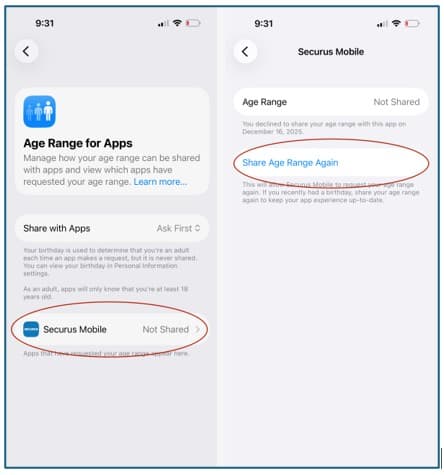
5. 返回并选择应用程序的年龄范围,然后找到并选择Securus MobileJPay

The image shows two screenshots from a mobile device. The first screenshot displays an "Age Range for Apps" section, while the second screenshot shows an "Age Range" section for "Securus Mobile" with an option to "Share Age Range Again".

6. 打开 Securus 或 JPay 应用,再次点击“分享年龄范围”以完成更新并开始使用该应用。
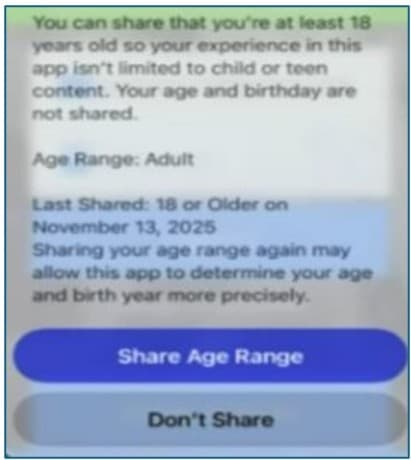
The image displays a user interface prompt asking the user to share their age range, indicating that their experience in the app is not limited to child or teen content, and that their age and birthday are not shared.
为了迎接1月1日的更新,请在Android设备上更新您的年龄:
  1. 打开Google Play商店。
  2. 点击右上角的账户图标或名称
  3. 选择“管理您的 Google 帐户”
  4. 点击个人信息
  5. “基本信息”下,更新或添加您的生日
The image displays various options and settings related to a Google account, including personal information, security and sign-in, and data and privacy settings. The background of the image appears to be a scenic landscape with a body of water and mountains.

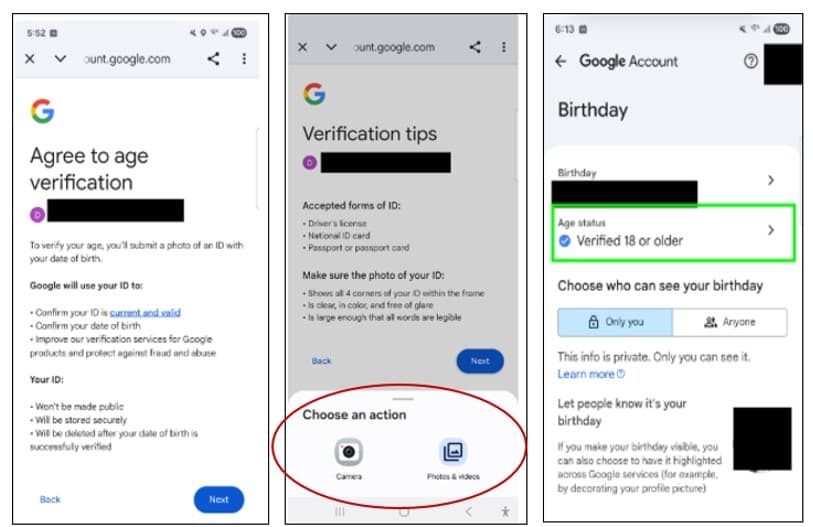
6. 如果您更新了生日,则必须使用身份证、信用卡或自拍照向 Google 验证您的年龄。以下示例使用驾驶执照验证您的年龄。
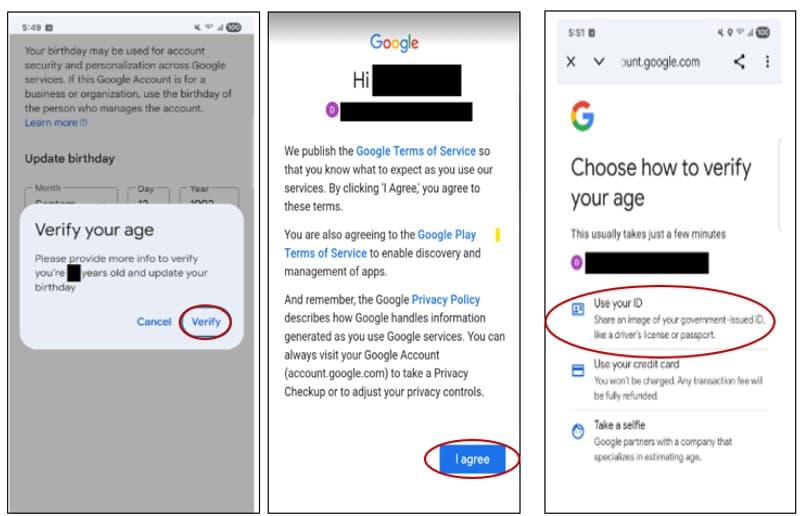
The image shows a mobile device screen displaying a Google account verification process, including options to verify one's age and a privacy policy notice.
The image shows a series of mobile device screens displaying various Google account verification and settings options.

7. 一旦年龄状态显示为“已验证 18 岁或以上”,即可打开 Securus 或 JPay 应用程序开始使用该应用程序。

经过 Securus Technologies | | Type: Securus Help